
Support / Tagtough and Magtouch Electronics desktop software
Desktop system troubleshooting
| Problem | What to try |
|---|---|
| Can't find the uploader | Check the cable connection |
| Make sure the program is open only once | |
| Reinstall the drivers: Help, then reinstall drivers | |
| Check that the computer sees the upload cable | |
| Unit clocks intermittently | Check the guard is clocking correctly |
| Unknown points on the report | Rename your points |
| Not clocking | Check the touch port for foreign objects and clean it |
| Clean and dry the ID points | |
| No report after a download | Check the download options: "ignore checkpoint" should not be ticked and "download baton" should be |
| Are the points being clocked properly? Is the baton communicating? | |
| Point flashes twice, or not at all | Faulty point |
| Windows error | Check whether you have the latest version of the software |
Trouble downloading a baton
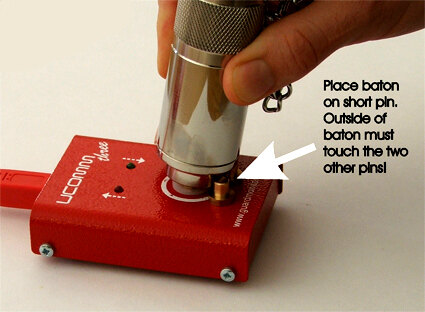
On a three-stud upload station the baton's copper port goes on the upper centre stud and its side rests against the two lower studs. It must stay in that position for the whole upload. On a Doc Pro, rest the baton on the support.